
Build a Professional Resume in Minutes
Create ATS-friendly resumes, customize sections easily, and download polished PDFs instantly.
What is ATS?
Understanding Applicant Tracking Systems and why your resume format matters
An Applicant Tracking System (ATS) is software used by companies to manage and filter job applications automatically. Before a recruiter ever sees your resume, the ATS scans, parses, and ranks it based on keywords, formatting, and relevance to the job description.
98%
of Fortune 500 companies use ATS
75%
of resumes are rejected by ATS before a human sees them
250+
applications per job posting on average
See What You Can Create
Professional, clean, and recruiter-ready layouts
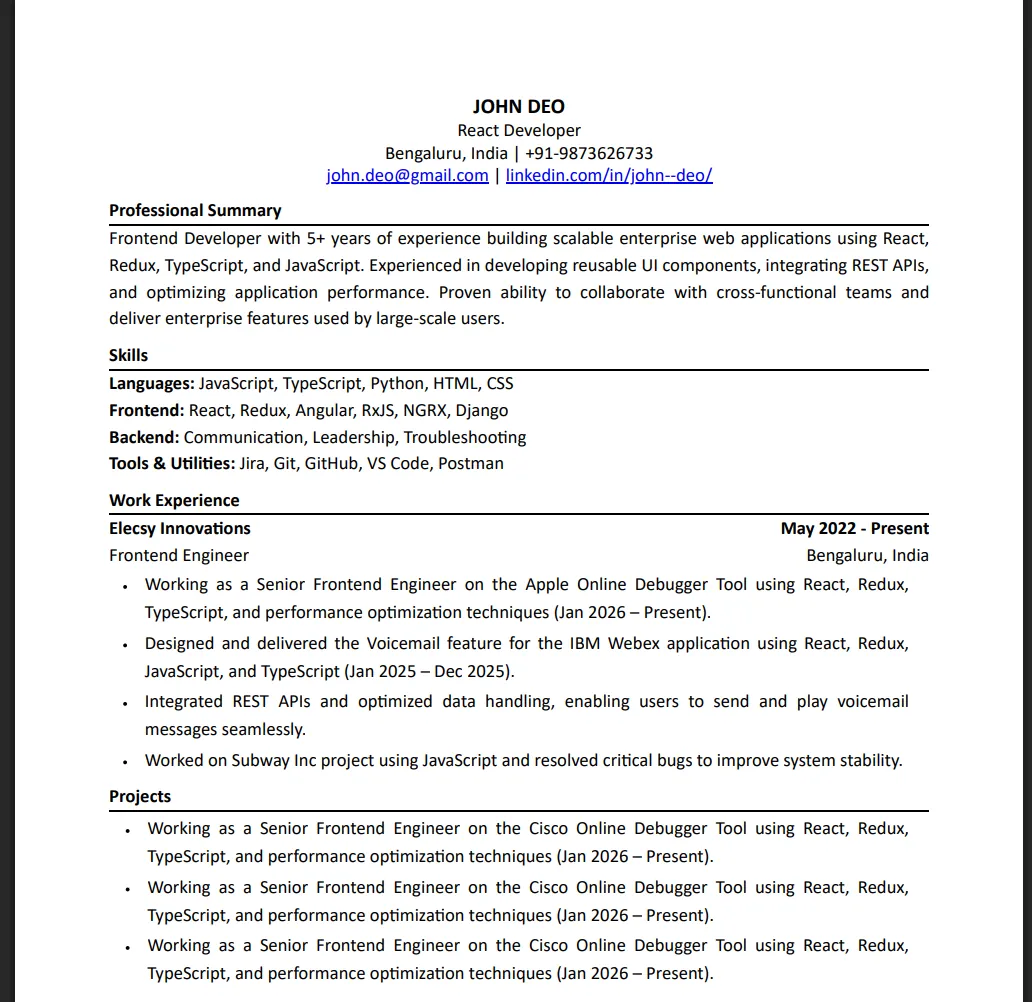 ATS Friendly
Coming Soon...
How Companies Use ATS to Screen Resumes
📄
Resume Parsing
ATS extracts your name, experience, skills, and education from the resume. Poor formatting causes data loss.
🔍
Keyword Matching
The software matches your resume content against the job description. Missing keywords mean automatic rejection.
📊
Ranking Candidates
ATS scores and ranks applicants so recruiters only review the top matches, saving hours of manual screening.
🚫
Filtering Out Bad Formats
Fancy graphics, tables, headers/footers, and non-standard fonts confuse the parser and get your resume rejected.
Why ATS-Friendly Resumes Matter
✅ A well-formatted, ATS-friendly resume increases your chances of getting shortlisted by up to 3x.
✅ Our Resume by Elecsy uses clean, structured layouts that ATS software can parse perfectly — so your skills and experience always reach the recruiter.
How It Works
Three simple steps to your perfect resume
📝
Step 1Fill Your Details
Add work experience, highlight projects, and showcase skills.
✏️
Step 2Preview & Edit Sections
Customize sections, rearrange content, and pick a layout.
📄
Step 3Download as PDF
Export your polished resume in one click.
Key Features
Everything you need to build a standout resume
✅
ATS-Friendly Format
Clean, structured layout that passes applicant tracking systems.
✏️
Easy Section Editing
Add, remove, or rearrange resume sections effortlessly.
🎨
Professional Templates
Clean layouts for students, freshers, and experienced professionals.
⚡
Instant PDF Download
Download polished, print-ready resumes instantly.
💾
Save & Edit Anytime
Your progress is saved — continue building your resume later.
🔐
Secure OTP Login
Your resume data stays safe and linked to your account.
PDF resumes ensure consistent formatting across devices and platforms, preserving the document's professional appearance
Digital resumes allow for easy editing, sharing, and collaboration, streamlining the application process.
Resume Tips That Actually Get You Interviews
Practical, recruiter-tested suggestions to make your resume stand out. Small details often decide whether you get the call.
🗓️
Always Mention Your Role & Project Timeline
Clearly state your role and the start–end dates for every job and project — recruiters check this first to gauge experience and stability. Example: 'Frontend Developer · Jun 2023 - Present' or 'E-commerce Checkout Revamp · Mar 2024 - Aug 2024'. Missing timelines make recruiters skip your profile.
🧑💻
Lead Each Project with the Tech Stack & Your Contribution
List the exact tools used (e.g., React, Node.js, PostgreSQL, AWS) and then describe what YOU built — not what the team did. Use lines like 'Built the order-tracking module using React + Redux serving 50k daily users' so recruiters instantly see your ownership.
📈
Show Impact with Numbers, Not Adjectives
Skip words like 'responsible for' or 'helped with'. Use measurable outcomes: '% improvement, users served, revenue, response time reduced, bugs fixed, releases shipped'. A line like 'Reduced API latency by 38% (450ms → 280ms)' is far stronger than 'Optimized backend performance'.
✍️
Write a Crisp 3-Line Professional Summary
Open your resume with a short summary: who you are, years of experience, top skills, and the role you're targeting. Example: 'Full-stack developer with 4+ years in React, Node.js, and AWS — built scalable SaaS products for fintech and healthcare.' Recruiters spend ~7 seconds here.
🎓
Put the Most Relevant Section First
Freshers should lead with Education & Projects; experienced candidates should lead with Work Experience. Move Skills above Education once you have 2+ years of work. Order your sections by what makes you look strongest for the role you're applying to.
🧹
Keep It to One Page (Two Max for 7+ Years)
Recruiters scan, they don't read. Cut older internships, irrelevant coursework, and generic hobbies. Keep bullet points to one or two lines each. A tight, focused one-pager almost always beats a cluttered two-pager — every line should earn its place.
🔗
Add Working Links to GitHub, LinkedIn & Portfolio
Include live, clickable links — not just text. Make sure your GitHub has pinned repos with README files, your LinkedIn matches your resume titles/dates, and your portfolio loads on mobile. Broken or mismatched links instantly hurt credibility.
🧐
Proofread Twice — Typos Kill Trust
A single spelling mistake in a Skills section ('Javasript', 'Reactjs') signals carelessness. Read your resume aloud, run it through a spell checker, and ask one friend to review it. Consistency matters too — pick one date format and one tense (past for old roles, present for current).
How to Improve Your Naukri Profile for Better Visibility
Your Naukri profile is often the first thing recruiters see. Optimize it to appear in more recruiter searches and get more interview calls.
Complete Your Profile 100%
- Fill every section — summary, experience, education, skills, projects, and certifications
- Upload a professional photo to increase profile views by up to 40%
- Add your current and preferred location for better job matching
- Mention your expected salary range to filter relevant opportunities
Use the Right Keywords in Your Resume Headline
- Your resume headline is the most searched field by recruiters on Naukri
- Include your job title, key skills, and years of experience
- Example: 'Senior React Developer | 5 Years | JavaScript, TypeScript, Node.js'
- Avoid generic headlines like 'Looking for a job' or 'Experienced professional'
Update Your Profile Regularly
- Naukri's algorithm boosts recently updated profiles in search results
- Update at least once every 2 weeks — even a small edit counts
- Add new skills, certifications, or projects as you acquire them
- Keep your 'Active' status on to show recruiters you're available
Write a Compelling Profile Summary
- Start with your current role and total experience
- Mention 3-4 core technical skills relevant to your target role
- Include a notable achievement with numbers (e.g., 'Reduced load time by 60%')
- End with what kind of opportunity you're looking for
Resume Examples by Role
See what a strong resume looks like for different roles. Each example includes key skills to highlight and tips specific to that profession.
💻
Frontend Developer
Frontend developer resumes should showcase UI/UX skills, framework expertise, and measurable performance improvements.
Key Skills to Highlight:
Resume Tips:
Lead with your strongest framework (React, Angular, or Vue)
Include GitHub profile or portfolio link
Mention performance metrics (e.g., 'Reduced page load time by 40%')
List specific projects with tech stack used
⚙️
Backend Developer
Backend resumes should focus on system design, API development, database management, and scalability achievements.
Key Skills to Highlight:
Resume Tips:
Highlight API design and database optimization experience
Mention scale metrics (e.g., 'Handled 10K requests/second')
Include DevOps and deployment experience
Show security-related work (authentication, encryption)
📱
Full Stack Developer
Full stack resumes should balance frontend and backend skills, showing end-to-end project ownership and delivery.
Key Skills to Highlight:
Resume Tips:
Show projects where you built both frontend and backend
Mention deployment and hosting experience (AWS, Vercel, etc.)
Include API integration and third-party service experience
Highlight any solo projects or startup experience
📊
Data Analyst
Data analyst resumes should emphasize analytical tools, visualization skills, and business impact of data-driven decisions.
Key Skills to Highlight:
Resume Tips:
Show business impact of your analysis (e.g., 'Identified trends that saved ₹20L annually')
Include specific tools and databases you've worked with
Mention any dashboards or reports you've built
Add certifications like Google Data Analytics or IBM Data Science
🎨
UI/UX Designer
Design resumes should include portfolio links, user research experience, and measurable design improvements.
Key Skills to Highlight:
Resume Tips:
Always include a link to your portfolio or Behance/Dribbble
Mention user research methods you've used
Quantify design impact (e.g., 'Increased user engagement by 25%')
Show collaboration with developers and product managers
📈
Digital Marketing
Marketing resumes should highlight campaign ROI, channel expertise, and data-driven strategy execution.
Key Skills to Highlight:
Resume Tips:
Lead with measurable campaign results (ROI, conversion rates, traffic growth)
Mention specific platforms and tools (Google Analytics, HubSpot, etc.)
Include certifications like Google Ads or HubSpot Marketing
Show content creation and strategy planning experience
Who Is This For?
Built for everyone who wants a better resume
🎓
Students & Freshers
Build your first resume confidently with guided sections.
💼
Working Professionals
Highlight experience, achievements, and career growth.
👨💻
Developers & Tech Candidates
Showcase projects, skills, and internships effectively.
🎯
Job Switchers
Tailor resumes for new roles and industries with ease.
Stop Fighting with Resume Formatting
Focus on your content — we'll handle the layout.
❌ Without This Tool
Hours lost tweaking margins and tab stops in Word
Layout breaks the moment you open it on another device
Bullets, fonts, and spacing drift out of sync
Generic templates that ATS scanners misread
Rebuilding the entire file for every new role
✅ With Resume by Elecsy
Recruiter-ready sections with zero formatting effort
Consistent, pixel-perfect layout on every screen
Live preview that updates as you type
Clean, ATS-parseable PDF in a single click
Edit once, reuse and tailor for any job in minutes
Built for Modern Job Seekers
ATS-Friendly
Resume Design
Secure
OTP Login
Instant
PDF Downloads
₹149 Only
Affordable Pricing
Frequently Asked Questions
Got questions? We've got answers.
What is ATS?
ATS (Applicant Tracking System) is software used by companies to automatically scan, filter, and rank resumes before a recruiter ever sees them. Over 98% of Fortune 500 companies use ATS to manage job applications.
Why is ATS important for job search?
Around 75% of resumes get rejected by ATS before reaching a recruiter. If your resume isn't formatted correctly or lacks the right keywords, it won't pass the automated screening — no matter how qualified you are.
Does this app create ATS-friendly resumes?
Yes! Every resume built with our tool uses clean formatting, proper section headings, and structured layouts that ATS software can parse perfectly — giving you the best chance of getting shortlisted.
Can I edit my resume later?
Absolutely. Your resume data is saved to your account. Log in anytime to continue editing.
Can I download as PDF?
Yes, you can download your resume as a polished, print-ready PDF with a single click.
Is login required?
You can start building without logging in. Login is required to save your data and download the PDF.
How much does it cost?
You can create and preview your resume for free. Downloading the final PDF costs just ₹149 — a one-time payment with no hidden charges.
Can I create multiple resumes?
Currently one resume per account. Support for multiple resumes is on our roadmap.
Ready to Build Your Resume?
Join thousands of job seekers who landed their dream roles.